Showing posts with label social selling. Show all posts

How to Use Instagram for Marketing in 2021

How to Use Instagram for Marketing in 2021

Instagram is a hugely popular app for using for sharing photos and video media.

Instagram was one of the top 5 most downloaded app with over a billion active users in 2020.

The app is immensely popular with Millenials and Gen Z, around 63% of Instagram users are between the ages of 18 and 34.

If the age of your target customers is under 35, you need to be marketing on Instagram.

Don’t know where to start? Read on — I’ve got you covered.


What is Instagram?

Since its launch in 2010; Insta, as its users lovingly refer to it, has become one of the most popular social media platforms of a generation. 

Mike Krieger created Instagram to allow users to edit and share pictures and videos from their mobile devices.

With this emphasis on visual sharing, the platform works similarly to other social networks like Facebook or Twitter. 

Users create a profile and have a news feed made up of content from accounts they follow and their interaction to scroll through. Users interact with other users by commenting, liking, tagging and private messaging.

“What is this trendy thing called Instagram that all the cool kids seem to be into? It’s been around for a few years, quietly picking up traction mostly thanks to everybody’s new obsession with mobile photography…” (Moreau, 2018)

The popularity of Instagram

Instagram is most popular amongst users aged 18–34 years. It is the second most accessed network behind Facebook.

Instagram has over one billion active monthly users, more than 60 million photos posted each day, 1.6 billion daily “likes” given, and 500 million Instagram Stories posted.

Users browse for an average of 53 minutes per day, and around 60% of active users visit the site daily, a further 21% weekly.


Instagram as a Marketing Tool

Instagram helps businesses to enhance their visual storytelling rather than just presenting textual information. With the number of active users and the ability to create and share different content types, Instagram can be a great marketing tool for the right businesses.

According to Social Sprout, the top three industries working with Instagram influencers are luxury brands, sports clothing, and beauty brands.

90% of Instagram users follow at least one business, and there are over 25 million business profiles on Instagram. 83% of users have purchased brands exposed to via Instagram. 

So, there is plenty of potentials, but you will need to optimise your profile and have a strategy to stand out amongst the crowd.

“Different social media platforms have become a natural part of companies’ marketing strategies, particularly in small and medium-sized enterprises.” (Virtanen, Björk, & Sjöström, 2017)

Setting up and Optimising Your Instagram Profile

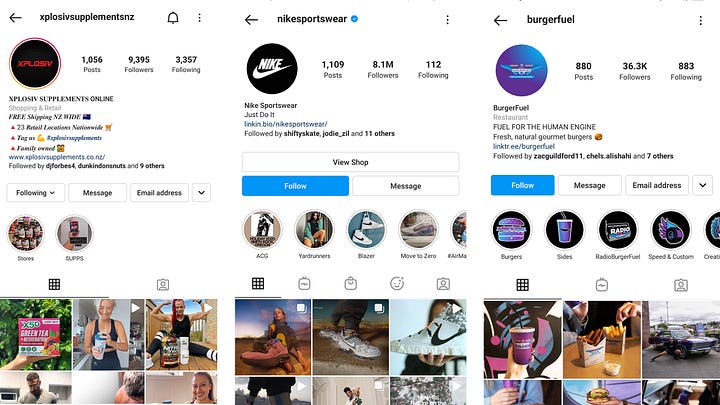
As your name, enter your business name, so you are recognisable — the same with your username, which is a name unique to your profile. Your profile tag we be @username, and your URL is www.instagram.com/username.

Users can search for your name and username, so again, pick a username that is recognisable and easy to find. If another profile already has your business name, make sure your business name is in your username. 

Both these names can be up to 30 characters long.
Instagram pages

Your Instagram bio description needs to make a great first impression, and you must do this in 150 characters. 

Therefore, it needs to be a concise summary of who you are and how you add value to incentive followers, with a hint of personality.

Instagram bios are not searchable, so do not worry about cramming keywords in there.

Your Instagram profile photo should be your logo. or another familiar image. The recommended size is 1350 x 1080px.


Business Account

There are two choices for creating your account: logging into your Facebook account or signing up via phone or email. A business account should sign up with a business email, so your Instagram profile is not linked to your personal Facebook account.

A business account is a must, as they have access to several functions unavailable to a personal account, including:

  • Instagram Insights to analyse how you are performing.
  • Instagram ads to promote and reach a larger targeted audience.
  • Instagram Shopping to showcase products and services.
  • Contact information for people to call or email you.
  • A call-to-action button on your profile, such as order food or book now.
  • A Category that tells people what industry you are in or the purpose of your profile.
  • URL linking to your website or other external sites that of your choice.

Instagram Settings

Via the three stacked lines in the upper right-hand corner of your profile, click on settings down the bottom.

There is a lot of settings here, too many to talk about them all. This section is where your privacy, security, notifications, and ads settings are. Via settings, you can manage things on your account,, such as your Stories and who can see them and reply. 

You can also restrict individual accounts (if you have trolls) from commenting and hide comments with certain words.

Privacy

On Instagram, you can follow people and they can follow you — you don’t mutually connect like on Facebook. Like Twitter, you can follow someone even if they do not follow you and vice versa.

Users can even put their accounts on private, so they can choose who sees their content. This setting makes it popular with teenagers who often have a private account separate from family.

A business account should be public and all the content public, or why bother!

Instagram Story Highlights

Instagram Stories can be saved and featured past their 24-hour limit on a profile, in the small circles under an Instagram bio. Think of it as an extension of your bio and an opportunity to showcase your best stories and products, services, promotions. Save stories that have performed exceptionally well will give your brand a great impression to anyone visiting your profile.
Marketing your business on instagram

How Instagram works

There are multiple functions to create and consume content on Instagram, so here is how it works.

Home Feed

The Instagram feed is where you see content posted from the accounts you follow. This feature is available from the toolbar with the home icon. Users can scroll through content from profiles they follow, like or comment on content, and also see content users they follow have engaged with. The algorithm decides what content is shown and is relevant based on your activity. Refresh the feed to show different content.

Explore

Explore page real-time content curation. Appearing on the same page as the search function, content a person sees is chosen based on their interaction and interests. When users engage, you are more likely to show up on their follower’s explore page.

Instagram Stories

Separate from regular Feed, coming in a “slideshow” format. Stories appear in a small area above the Feed. Stories disappear after 24 hours but can be saved to your profile, as mentioned above.

Viewable on your profile if someone clicks on your profile photo or in the Feed over followers. You can use Hashtags and geotagging (location) to increase your audience potential.

Many more extensive profiles often post numerous a day, and they are usually less polished than a post. Often spur of the moment or behind-the-scenes.

Instagram Reels

There is a new tab on the toolbar called Reels. Reels are multi-cut videos that are essentially Instagram’s answer to TikTok. Fifteen seconds long, users create Reels from the Instagram app camera. There is a catalogue of music, sound effects and user-generated Reels media available to create a video.

Brands can use Reels to create engaging content.

“Social media marketing is particularly powerful in supporting new product launches.” (Virtanen, Björk, & Sjöström, 2017)

Instagram Shopping

Instagram allows business profiles to create an online store on Instagram. Shopping now has its tab on the toolbar, and users can view an individual brand’s shop from a button on their profile.

Via the Shop tab on the Explore page, users can search for products or see products from brands they already interact with on Instagram. One hundred thirty million Instagram users tap on shopping posts every month.

Businesses can tag products in posts, Stories, and on IGTV. Then, by turning on Auto-highlighting in settings, all posts with product tags are saved to your profile’s Stories Highlights, so they are viewable on your face.

IGTV

IGTV is a long-form, vertical video format. 

IGTV allows Instagram users to create channels to upload videos between 15 seconds and 10 minutes long. There is a standalone app, but users can also find IGTV content on Instagram through previews in Feed, the IGTV channel in Explore, and creators’ profiles.

Instagram TV

Instagram Strategy

Now we know about some of the features of Instagram. It is time to think about your business strategy to harness some of this platform’s power.

Define Your Goals and Your Audience

Think about what you are trying to achieve on Instagram. It is likely to be one or more of the goals below.

  • Create an online presence for your business or brands.
  • Increase brand awareness.
  • Get new leads.
  • Establish your brand as an industry leader.
  • Sell products directly from the app.

Define your target market to help you create content that this audience would be interested in.

Best Time to Post and How Often?

Try to post when your audience is most active. The best time to post is when followers are on Instagram, between 8:00 am and 9:00 am (when people are getting ready for work etc.), or midday until 2 pm.

Sunday is the worst day to post content, and Monday and Thursday the best days. Schedule your posts to go live during these periods with tools like Hootsuite or Sprout Social.

Post consistently to stay in the Feed of followers regularly, but do not over-post. One to two posts per day maximum, so you do not overwhelm and annoy followers.

If all they see is your brand on their news feed, they might unfollow you.

“The most efficient practice in generating followers for a company’s Instagram account is following other users — in this case, potential customers. This action-reaction pattern can be called “follow for follow”, describing the practice of following to be followed back.” (Virtanen, Björk, & Sjöström, 2017)

Engage with People and Content

If you want engagement on Instagram, you must engage yourself,, how the algorithm works on many social media networks.

Respond to comments on your content. It also pays to seek out popular accounts in your industry, follow them, and like and comment on their posts.

Virtanen, Björk, and Sjöström (2017) found a positive relationship between following other accounts and receiving likes on your content. It works as a bit of giving and take.

After you follow an account and interact with their content, you naturally draw attention to your account. That user then receives a notification when you engage, prompting them to check out your account and start following you.

If somebody tags you in their Story or post, make sure to give them a thumbs up or respond. Better yet, reshare their Story to your own.

Use Stories

Stories are a vital part of an Instagram marketing strategy. Business post a third of the most-viewed Stories on Instagram. Therefore, it does not matter if you are a friend or brand — if you post interesting content, people engage.

Have a message in mind with your stories; try not to post meaningless random content unless you want that associated with your brand.

Experiment with different types of content to see what engages their audience best. Types of content available for stores are:

  • photos
  • short video
  • rewind video
  • live video
  • boomerangs (images that play on a loop)

Use tools like Canva and InVideo to edit images and videos to make them branded and stand out. Other functions include tagging other accounts, adding a location GIF, music, poll, a countdown sticker to a product launch or special event, and let people ask questions.
Kylie Jenner Instagram

Use Influencers for Wider Reach

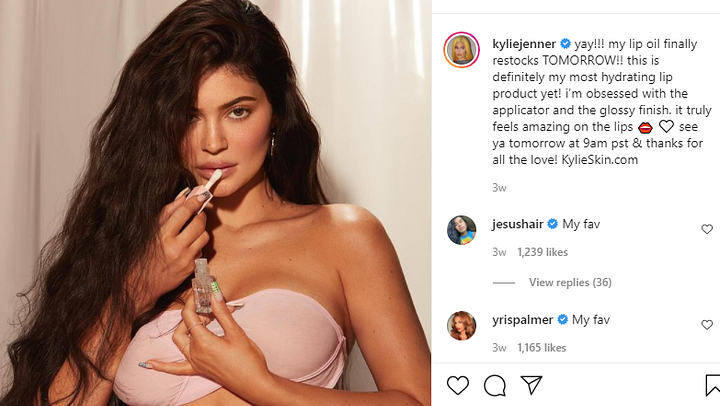
A popular marketing tactic on Instagram is to use the fame of a celebrity or well-known public figure to promote your brand. This benefits a brand by exposure to the large audience of the influencer.

CivicScience found nearly half of daily Instagram users made a purchase based on an influencer recommendation. Followers trust the advice of influencers.

The influencer’s audience must be relevant to your brand. Otherwise, the audience is useless if they are not interested in your product or service.

A common influencer tactic is an Instagram takeover, where an influencer temporarily takes over the account to create and share content and engage will followers.


Content Tips for Posts

To upload content to Instagram, you must use the mobile app. A post on the Instagram feed can be a single photo, multiple photos, or a video. This section will discuss those individually, along with types of posts.

To make your content easier to find, add a geotag. Geotagging is adding a location, which gives users another way to find your content, leading to higher engagement.

Try and make the look of your content consistent across your posts; this will make your content more recognisable to followers quickly scrolling through their feed.

Brands should create content to showcase their brand by educating or entertain their audience.

Content Ideas

Stuck for ideas of what to post content about? You cannot go wrong using one of these approaches for a post idea that should engage your audience.

  • Behind-the-Scenes posts give a snapshot of your workday — your office, storefront, or manufacturing process, for example, providing followers with a glimpse into the business.
  • Relationship Posts show the people you deal with and can be shown off through photos of you out for coffee at a meeting, for example. People love humanised content, and it is easy to relate to. You cannot go wrong with smiling faces!
  • Educational/Instructional Posts teach the audience how to do or make something or explores a topic. If it is in your expertise, this will be engaging and build credibility.
  • Product teasers allow you to talk about your product and increase excitement in a less obvious way. Do not try too hard to sell that will turn away followers.
  • Motivational posts work well on Instagram. Overlays a simple visual/photo with an uplifting quote. The caption can tell a story about the quote. Reinforce your brand values.

Using User-generated content —Reposting the content that your audience shares your brand is a great way to regularly post, without always creating the content yourself.

One way to source user-generated content is by holding a competition that uses a branded hashtag. Users create content about brand, using your unique hashtag. You can also tag the users who created the content you share, which helps build a closer relationship with your audience through a close-knit community.
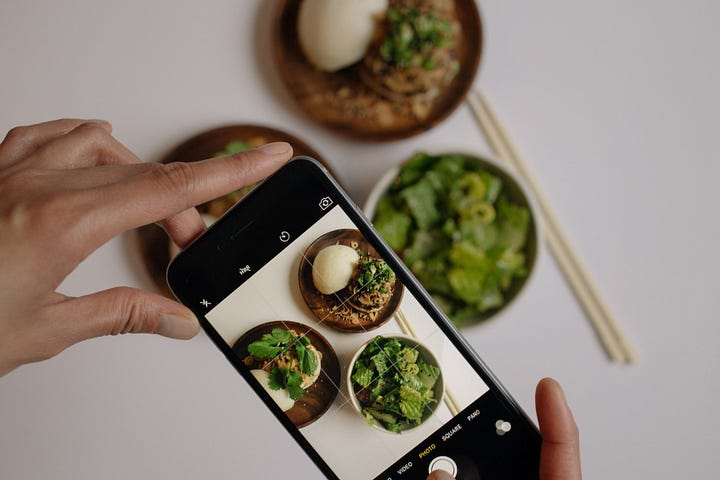
Taking a photo of a meal for instagram

Photo or Video?

Instagram users can share two types of content: photo and video.

Photos

Instagram was created for photos, and there is a lot you can do.

Firstly, leaving negative (empty) space around the image’s subject will draw attention to the desired focus. Try to shoot photos from a different perspective to give them personality and use natural light when possible. Always keep your content on-brand, no matter how random or cool you think something is personally.

No amount of editing can fix photos if they have lousy composition or lighting.

Users can edit photos from within the app, but all the world editing will not fix bad images. Instagram allows you to edit and adjust the brightness, contrast, warmth, saturation, highlights, shadows, vignette, tilt-shift and sharpness.

Instagram also has up to 23 filters that change the look and feel of images in an instant. However, be careful not to over-edit photos. It starts to look a bit of plastic when audiences want authenticity.

The recommendation for image size is 1080 x 1080px for square image and 1080 x 566px for landscape.

Selfie stick used for filming

Videos

Although photos are the most popular form of content, there is also a lot of video content on Instagram. Videos must be less than a minute in length, but you can use ITV to go longer.

Users can trim videos within the Instagram app. Still, it pays to use a video editor such as Splice that allows you to cut together multiple clips and add transitions, titles, and music.

Show some personality in your videos and showcase your brand’s benefits to your target audience.

Go live

Share content with your audience in real-time by broadcasting live video, allowing you to connect with fans personally.

Live video ideas include:

  • Collaborate with an industry expert or influencer using the “Add a Guest” option to go live together.
  • Offer a live behind-the-scenes look at an event.
  • Share a tutorial.
  • Host a Q&A.
  • Talk to a client or customer.

Writing your post caption/copy

Try to post entertaining and engaging captions. Be witty, or funny, or intelligent; it all depends on your brand and your audience. What will resonate with them?

Posts can have up to 2,200 characters long, which is quite considerable compared to 1200 on LinkedIn or 280 on Twitter.

Therefore, posts can range from one sentence to detailed storytelling.

Using bullet points or emojis in the same way as bullet points can make the text easier to consume. Helpful, as people tend to scan captions rather than read them thoroughly.

Try to get all the essential information into those first two lines as users must click to read the rest. You need to hook them.

Hashtags

Hashtags are keywords/phrases spelled without spaces, prefaced with a Hash (#) sign. Using hashtags will increase your visibility and discoverability, and hashtags aggregate posts from various users with public profiles into a single feed.

Hashtags should be relevant to your audience and specific to your niche.

You can use up to 30 hashtags in an Instagram post. But probably do not want to do that. Hashtags should be natural in your caption. Aim to use two to nine hashtags per post.

Avoid making your captions hard to read and looking spammy.

Create a personalised branded hashtag to interact with your audience with user-generated content and make content featuring your brand easier to find by clicking on that hashtag.

It helps you quickly find user images of your brand that you might want to share. User content always seems authentic to help add credibility.
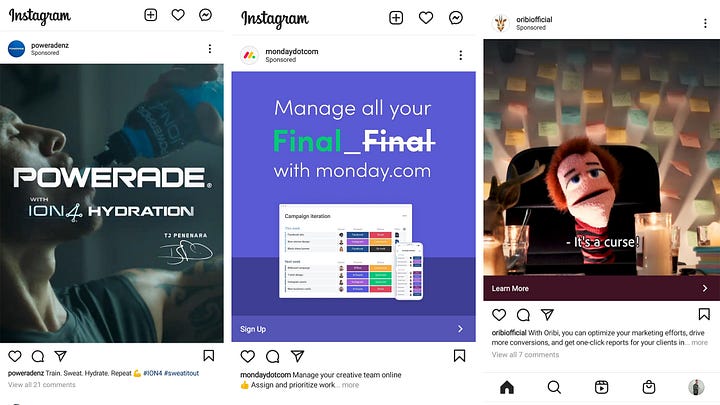
instagram ads

Instagram Ads

Using ads helps businesses get their content in front of a larger audience of people who fit their target market but do not follow the page. Use content for ads that will be engaging and appealing to your target audience. Do not be pushy with sales tactics in your ads.

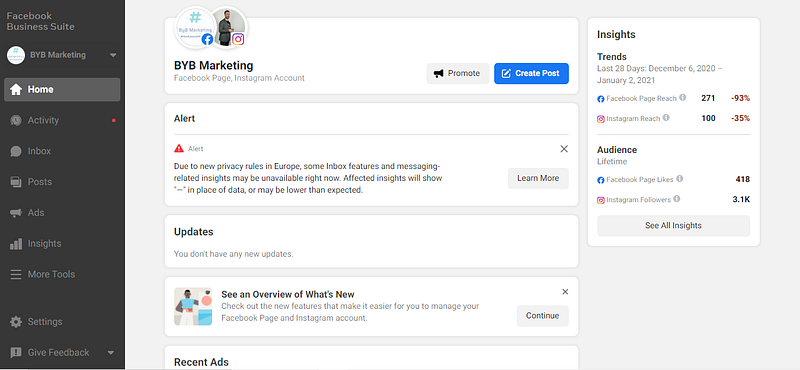
Instagram ads are created through Facebook’s Business Suite (Facebook owns Instagram). To post to Instagram, under placements, select Instagram.

You can turn existing posts into sponsored ads, called boosting content, or create a new ad.

Ad types include:

  • Single Image
  • Video Ads
  • Story Ads
  • Carousel/Dynamic Ads
  • Stories Canvas

Instagram ads can target users based on characteristics such as:

  • Location
  • Demographics
  • Interests
  • Behaviours

Custom audiences from databases of existing relationships can be uploaded and use to create lookalike audiences. These lookalike audiences are chosen based on similarities they have with people on your database — for example, similar behaviour and interests.

When setting up your ads, they need an objective. This objective could be:

  • Brand Awareness
  • Reach
  • Traffic
  • App Installs
  • Engagement
  • Video Views
  • Conversions

Ads are set up with a start and finish date and a lifetime budget, meaning you can control how much you spend on ads.

To maximize ad delivery, Instagram recommends using images that are at 600 x 600px for square format ads, 600 x 315px for landscape ads, and 600 x 750px for vertical ads.
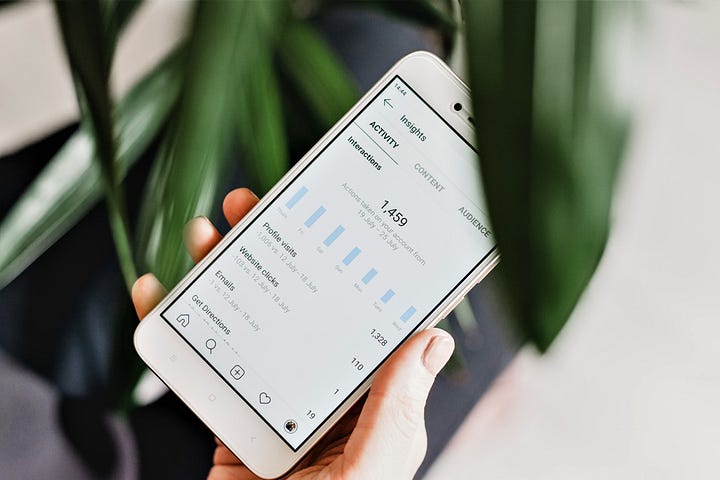
Instagram Analytics

Instagram Analytics

You can analyse how your efforts on Instagram are working through Insights. Staying on top of analytics allows you to optimise and hopefully improve your Instagram performance. Learn what works and what is not.

Key metrics to keep an eye on follower are impressions, follower growth rate, average engagement rate (likes and comments), and your URL click-through rate.

A better understanding of your audience, such as their demographics like age, gender, location, anmost active times,ctive; gives you objective knowledge of tailoring content to their preference.

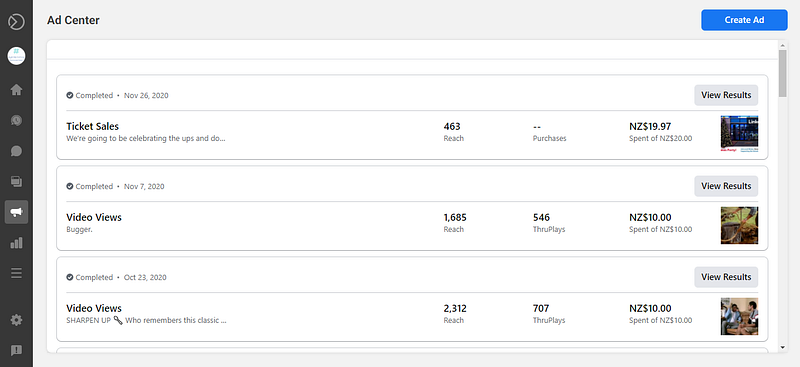
Facebook’s Ad Manager also allows you to check how your advertising is doing, which will improve your content and audience targeting.

Trial and error will help you fine-tune. If an audience is not responding as much as you would like, tweak it and the content — change the copy or use a different image/video.

Check out what your competitors are posting with a competitive analysis. Using the search function, use keywords related to your industry to find similar accounts. Stalking other users will give you great ideas on what type of content to create yourself.


Summary

And there you have it — a guide to marketing on Instagram in 2021.

The article first explored the benefits of using Instagram to market a business, set up a business account, and optimise it.

We then learnt how the platform works and the different content types that can be shared on the platform.

Finally, I discussed strategies that businesses can use on Instagram to get the most out of the platform, such as tips about ideas for content, using paid ads on the platform and understanding the analytics.

Thanks for reading.

I hope you enjoyed the content.

Dan

This content was originally posted on the BYB Marketing Blog

The Ultimate Guide to Facebook Marketing: 2021 Edition

Facebook marketing 2021

A business page on Facebook is a valuable tool for any marketer, whether you are a consultant, SME or corporation. 

Ever since Facebook launched in 2004, it has continued to grow inactive users. It is the most popular social media platform across the globe and the second most visited website. 

Literally, billions of people are using Facebook every week. So it’s an excellent opportunity to put your brand in front of your target market and grow an audience with people who could become customers.

However, Facebook is not static. It is always updating the algorithm and including new features for users.

Luckily, I have created this guide to marketing on Facebook in 2021 with up to date information about setting up your account and the tools available for you to use.


Social media for marketing

Social media networks are online platforms for exchanging information, communication, and connecting to maintain and form relationships.

Social media plays a vital role in modern culture, with one-third of the total time online across the globe spent on social media.

According to Boyd and Ellison (2010), social media can is a “web-based services that allow individuals to

(1) Construct a public or semi-public profile within a bounded system,

(2) Articulate a list of other users with whom they share a connection, and

(3) View and traverse their list of connections and those made by others within the system.”

From a marketing point, social media offers several advantages to businesses.

People use social media to express their identity, but they also use it to learn about products, brands, and topics that interest them. Therefore, social media is an excellent opportunity to showcase a brand and learn more about the target market’s preferences and consumer behaviour.

“The Internet environment and its increasing significance started to play a vital role in motivating customers in their decision whether to buy a product or not. The great advantage of social media (apart from others) is the fact that they are available for all sorts of businesses — no matter their size and specialization.” (Copuš, & Čarnogurský, 2017)

Social media is a low-cost marketing tool — it can even cost nothing (besides your time). Access to social media is readily available to any business that wants to set up an account, anytime they want.

Usage level by potential customers is large, meaning it is easy to be noticed by your target audience. There is the ability to go ‘viral’ with content seen by many people for little effort or investment.

The ease of linking content to your website to potentially convert leads into paying customers is another significant benefit.

Social media has become essential for any businesses’ marketing strategy to engage with their target consumers to generate brand awareness and create a loyal following.

“Two-thirds of Facebook users say they visit a local business Facebook Page at least once a week.” (Kawaf, & Istanbulluoglu, 2019)


Why is Facebook so crucial to marketers?

Facebook is a useful tool for marketers wanting to use social media for social selling as part of their broader marketing strategy.

According to Facebook, by 2018, they had over 2 billion monthly active users, along with 60 million business pages.

This high number of active users that makes Facebook such an appealing digital marketing platform.

Another drawcard of Facebook is the ability to facilitate mutual communication and interaction to build relationships with a high number of potential customers.

“Facebook allows companies to connect with many more people and much more often than the companies would be able to approach through phone calls, emails, or meetings.” (Ramsaran-Fowdar, & Fowdar, 2013)


Setting up your Facebook business page

Do not make the mistake of setting up a personal profile for your business! Make a business page, to receive all the benefits such as analytics and paid advertising.

It is a good idea to set up Facebook Business Manager to organise and manage all your Facebook marketing and advertising activities from a central location after you set up your business page.

To set up a business account, log into your personal account and go to facebook.com/pages/create.

Before we get into it, it is essential to say that if you want to be successful on Facebook, you need to know a lot about Facebook and how things work. Facebook continuously updates the platform, so things change. Learn about Facebook and how it operates. Use the help section on the Facebook website and Google any queries.


Complete your Page info

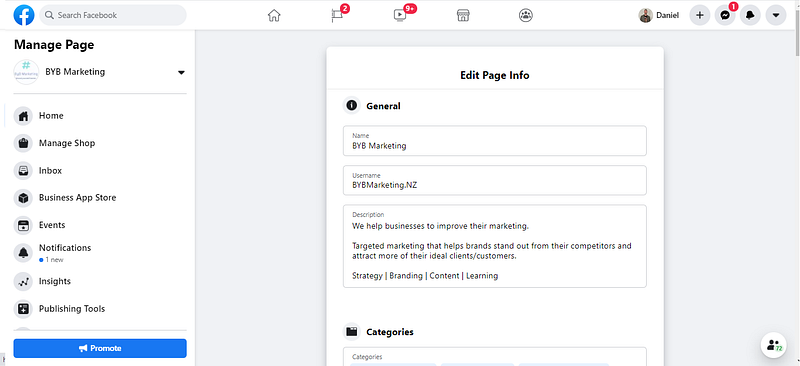
Complete every component of your profile to get the most out of your Facebook business account. Under manage page, edit page info.

Add a username — it can be up to 50 characters long. It makes sense for it to be your business/brand name, consistently named with other social media. Essential to your branding, this will become your personalised URL — e.g., facebook.com/yourbusinessname.

The name you want may already be in use by someone else. If so, create a username as close and relevant as possible to your brand name.

Facebook business page about info

Fill out your ‘About’ section with necessary information such as a brief but descriptive summary of who you are and what value you bring, your contact details and website, operating hours, and price range (if relevant).

Search engines use this information to ensure you use relevant keywords and ensure it is consistent with your other information on the web.

Make sure your profile aligns with your brand’s overall marketing strategy. It should reflect your brand’s unique identity, so people know what your page is about and what you do when visiting it.


Business page template

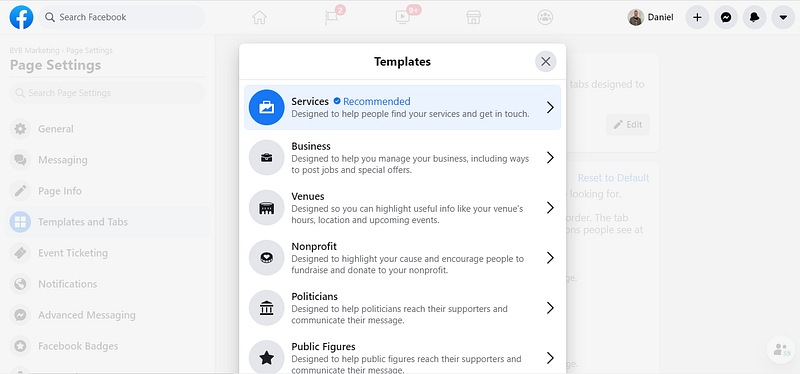
Customise the look of your Business page through one of their templates. There is a variety available to help businesses showcase content to fit their business needs best, prioritising your business type’s most critical information or content.

To change your template, select the Page Settings tab of your Facebook business profile and then click on templates. Templates available are:

  • Services
  • Business
  • Venues
  • Non-profits
  • Politician
  • Public figures
  • Restaurants & Cafes
  • Shopping
  • Video page
  • Standard
Facebook business page templates

Profile images

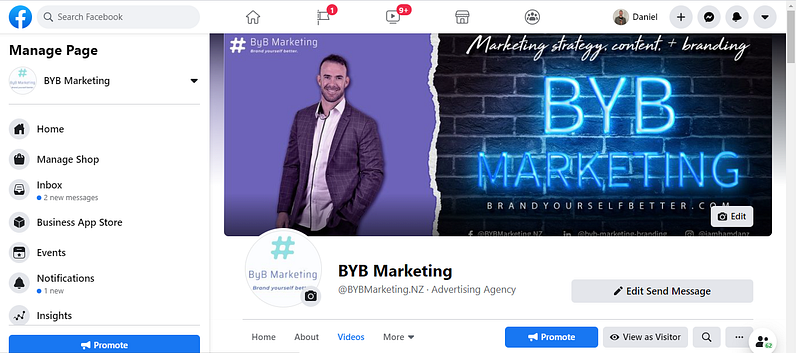
Your profile picture should be easy for your target audience to recognise — either the company logo for a brand or your headshot if you are a freelancer or consultant.

Make it high-quality and engaging to your visitors. Same with your cover photo — this is an excellent opportunity to capture your target audience’s attention.

It needs to be clear what you do and the value you bring. Facebook allows you to upload a video for your cover also — this can be an opportunity to showcase your business via video.

profile images - facebook business page

Currently, profile pictures display at 170 × 170 pixels on desktop, and 128 × 128 on smartphones. 170 x 170 is the recommended size

Cover photos display on desktop at 820 x 312 pixels and smartphones at 640 x 360. Facebook recommends 851 x 315 to work best on both.


Call to action

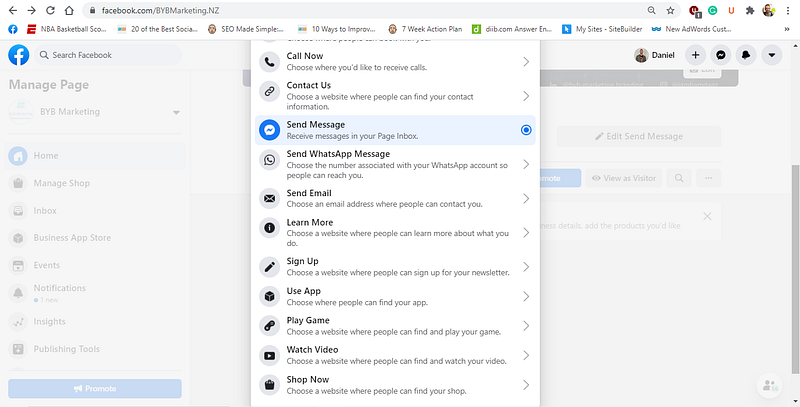
Make sure you enable your call-to-action button. The call-to-action button has several options such as “Sign Up,” “Send Message,” or “Learn more”, which directs to a destination URL (webpage) of your choice.

A call to action makes it easier for customers to take the desired action, and it can help drive more traffic to your website (if that is where the URL sends them).

Facebook business page call to action

Define your audience

An essential component of any marketing strategy is knowing your target audience and planning how best to communicate with those people with the right content.

Knowing this will also help target in paid advertising when you set up your audience. Ads are covered later in this article.

Some of the questions you need to answer are:

  • What is the age of your target audience?
  • Where do they live?
  • What are their occupations?
  • What are their interests?
  • What are their goals?
  • How do they use Facebook?
  • When do they use Facebook?
  • How often?
  • Are they educated?
  • Are they Married?
  • What language/s do they speak?
  • What is their purchasing activity online?


Messenger

Facebook Messenger is the second most downloaded app after Facebook, with over 1.3 billion people using Facebook Messenger each month.

Many users open their Messenger messages. According to Mobile Monkey, email typically has around a 5–10% open-rates and a 1% clickthrough rate. However, Messenger can have open-rates over 50% and a 20% clickthrough rate.

With so many people with the messenger app installed, they receive a notification instantly to their smartphones. In contrast, a message may sit in an email inbox for several days before someone checks their email and notices it.

If you respond to customers instantly, there is more chance of converting a sale.

To ensure your response time on your Facebook business page is as quick as possible, you can set up a Messenger Bot. After all, most businesses do not have time to answers monitor their messages. You must work and sleep, right?

Messenger bots are a type of Chatbot. Chatbots are a tool with artificial intelligence to simulates human conversations with internet users.

Chatbots communicate with your audience naturally, whether it be to answer a customer’s query or inform them what is going on in the business, such as promoting a new product or service, or upcoming sales.

Bots can be highly-tailored to answer almost anything a customer wants to know about your business — without needing a human being’s time. They can even be programmed to have information about your entire product catalogue to recommend the best solution to their needs.

They are more simple than you probably think to set up — there are multiple tools available to help create your bot. Read this guide from Hootsuite to on how to set up a messenger bot.


What do I post on Facebook?

Facebook as a marketing tool allows businesses to control the type of content they share when they share it and how often.

But what type of content should your business post? Motivations for people who engage with Facebook pages include socialising, entertainment, self-status seeking and information seeking.

Post content authentic to who you are and your expertise and aim to encourage meaningful conversations.

For example, a real estate agent could post content with tips for sellers when putting their house on the market, and a plumber or handyman could post DIY guides on how to fix common household problems.

The Facebook algorithm prioritises the content people see based on what they usually interact with and popularity of the post.

Think from your target customers’ perspective and what content they would find valuable, informational, thought-provoking, emotional, or entertaining. Creating this type of content will boost your credibility with your audience.

Desist from posting clickbait and too much spammy content.

A good rule of thumb is posting original material 70 percent of the time, share other content relevant to your audience’s interest 20 percent of the time and 10 percent of your content self-promotional or sales orientated.

Do not be limited to one or two types of content and embrace the opportunity to experiment with different content formats to see what works best for engaging your audience.

If you post content using Facebook Business Suite, it also goes on your Instagram account.

Facebook business suite

Photos & videos

Visual content such as photos, infographics, and video, is more likely to get shared on social media than other content. Including a photo means more of your followers will notice your post as they mindlessly scroll through their feed.

Facebook users are far more likely to engage than with a post with text alone.

It pays to invest a reasonable amount of time and other resources into creating video for your social media. Many people casually scroll and watch videos during downtime at home or work.

According to WordStream, 45% of people watch more than an hour of video on Facebook or YouTube a week.

Some of these people prefer to scroll in silence as to not interrupt people around them. Some studies have indicated that up to 85% of users watch Facebook videos on silent. Therefore, including captions in your videos to videos is a no-brainer.

Research carried out by Facebook found that adding subtitles increases view times by 12% on average.

Use different orientations for creating videos.

Facebook Stories are in Portrait mode; you should shoot some video content in this orientation. Many people watch a video in landscape view. Still, a study from Buffer found that square videos perform best and receive up to 35% more views than landscape videos. Users can watch square videos easily whilst scrolling through the feed without turning the mobile sideways.


Facebook live

Give Facebook live a try. As you would expect, this is when a video is recorded and broadcasted simultaneously.

Going ‘live’ can create a buzz as it gives an ‘in the moment’ look of a business and what you do. Doing video life and unedited can seem more personal and authentic, as there is no chance to edit or perfect the footage. Viewers can also comment and ask questions that the creator can respond to in real-time.

Some people are more likely to watch live streams than pre-recorded videos. Figures indicate people spend more than three times longer watching a Facebook Live video than video that is no longer live.

Your followers receive a notification when you go live and promote the fact you will go live 1–2 weeks beforehand if you feel the video will add value to your audience. You want to ensure people know it is happening and are available to watch.


Facebook Stories

Over 500 million people view Facebook Stories every day. Stories are photo or short video posts in a vertical format (for mobile phones) that appear in vertical format and disappear 24 hours. Photos last for five seconds, videos up to 20 seconds before it skips to the next story.

Stories from your friends or pages you follow are arranged based on an algorithm based on your engagement. Found at the top of the News Feed, meaning Stories are quite prominent to the platform.

Snapchat originally popularised the concept which has now spread to other platforms, including LinkedIn.

Post ‘stories’ of your workday, special projects, locations you visit or the products you sell. Give viewers a snapshot of your business.


Post frequency

When and how frequently to post is an important consideration. Posting too often or not often enough will reduce your organic reach. Organic reach is the number of people who see your post in their feed.

Your marketing patterns can also impact how your audience views your business. If you post occasionally, your audience will stop looking for your content and will be less engaged.

Consumers might think you are unreliable compared to another business who posts consistently.

Would you trust a business who has not updated their Facebook Page for months? Posting consistency is essential to building a strong brand.

On the flip side, posting too frequently means your audience may get sick of being bombarded with your content and may unfollow you. It is also hard to keep the quality high if you post too frequently as it takes time and effort to create quality content.

Research has indicated a stark difference between business pages and media pages with post frequency. Media-focused pages have an allowance of a lot more content before being penalised by the algorithm. For brands, aim for post per day (5–10 posts a week); and for a media company, up to seven posts a day (approx. 50 posts a week).

The timing of when you post on social media can impact your engagement. The highest traffic on Facebook occurs around mid-day Wednesday and Thursday. Try and post in this window and vary the other times you post, to see what works for you and your audience.

To help optimise your strategy, try creating a content calendar with a plan for what types of content you will post and when to ensure variety and keep you accountable to a schedule.

Make most holidays, popular shopping dates and seasons such as Easter, Valentine’s Day, Black Friday, and winter.

Is your product mostly consumed at certain times of the year? If so, you will need focused marketing on the lead up to these dates.


Engage with your audience

Take time to respond to peoples’ comments on your posts and reply messages. Engagement encourages engagement, and socialising with your followers creates a community.

Engaging with your audience keeps you top of mind and your followers will feel more valued and validated that you care what they had to say. Regular engagement should be a positive influence on whether they become a customer, or you retain their business.


Facebook Ads

Facebook has led the way in terms of hyper-personalised advertising.

As annoying as it sounds, if you want to use Facebook to its full potential, you will need to pay for advertising. Organic reach (unpaid) has been declining for several years.

Ads help your content to reach a broad but targeted audience and use the platform to its full potential.

There are 7 million advertisers on Facebook, which means newsfeed space is highly competitive and therefore, organic reach has reduced, and the algorithm favours paid content.

Cost-per-click varies, but it will probably cost you around 50 cents to $2 per click.

“The time spent on Facebook by individuals and the accessibility of Facebook using mobile phones, Facebook represents a highly familiar tool for many individuals and one of the easiest sources from which to find information online.” (Önder, Gunter, & Gindl, 2020)

It is vital to set up a Facebook pixel if you are sending traffic to your website. This pixel is a piece of code placed on your website that track who visits and their behaviour. You can then remarket to people who have already visited your website.

The power of remarketing is that you know these people are interested in what you do because of their behaviour, so your advertising spends very targeted.

For example, you could target people who put an item from your store in their cart but did not purchase. Advertise to these people a special offer which hopefully they cannot refuse.

Facebook business page — ads

Types of ads

Facebook offers a lot of ad types. Majority of Facebook Ad revenue is from mobile, so make sure your ads are in mobile-first format. Before getting into the different types of ads, you can ‘boost’ an existing post. If you create a post that you think would work well as an ad, you can boost that content to reach a larger audience that you chose.

First, ads need a goal. Goals can include generating leads, receive messages or to increase website traffic. Facebook offers three broad Ad Objectives.

Awareness is about putting your brand out there, so potential customers know you exist. Tell your story and showcase your knowledge and expertise to connect with potential customers. This phase targets the top of a sales funnel.

Consideration is when people start seriously thinking about your brand and what you offer. These consumers consider purchase options and begin to do their research and want more information about what you offer. This phase targets the middle of the funnel.

Conversion is when people carry out a specific action such as purchasing a product or service. The goal is to encourage this action to convert customers, targeting the bottom of the funnel.

The Individual ads that you can create for different goals are:

  • image or video ads
  • carousel ads
  • slideshow ads
  • collection ads
  • instant experiences ads
  • dynamic ads
  • Messenger ads
  • Stories ads
  • augmented reality ads
  • playable ads.

Facebook has recently introduced Augmented Reality tools for advertisers. Augmented reality ads can help demonstrate what a specific product looks like on a consumer, such as trying on makeup or clothing.

Try out different types of ads and run two to three ads at a time for testing.

Change only one element in each ad, such as an image, the copy, or the call to action; then measure the performance. Called single variable testing, this helps you to improve your ads based on their performance.

If you do not test your ads’ different components, they could be under-performing, and you do not know why.

Use automation tools that Facebook provides, such as:

Automatic Placements, which is when Facebook chooses your ad placements. Facebook can also run ads on Instagram, Messenger, and other relevant apps or webpages.

Campaign Budget Optimization is setting your budget at the campaign level, instead of at an ad level. It may not spend your budget equally, but instead, it gives the flexibility to spend in the best way it seems fit. Underperforming ads receive less allocation, and well-performing ads receive a higher ratio of spending.

Dynamic ads are versions of your ads personalised to each person who views them, depending on their behaviour and what types of content they are likely to engage. Several images, videos and text are supplied by the user, used as the basis for each unique ad.


Facebook analytics

Track and measure how your performance of organic posts — will help you know what types of content do well and what does not. Observe popular times to post, for example, and other variables, refine your content strategy accordingly to yield better results.

Use Facebook’s free internal analytics tool ‘Insights’ to provide you with a clear picture of how your business page is doing. Key metrics to monitor are:

  • Post Reach (how many people saw your posts)
  • Engagement (how many people liked, clicked, shared, or commented)
  • Posts that result in people unliking your Page
  • Follower growth
  • Audience insight such as the audience demographics engaging with your content

Analytics can also help you build targeted custom audiences for future ads based on what you learn about your content engagement.


Facebook Groups

As of April 1999, there are more than 10 million Facebook groups, with 1.4 billion people using them every month. Consumer behaviour on Facebook has started to move away from engaging on public pages to private groups, focusing more on business owners moving forward.

Facebook Groups are like a forum — a discussion platform and communication space for people with similar interests.

Groups are often hyper-focused on a specific topic. They tend to bring high engagement, as group members are passionate about and interested in the topics discussed. Group members get to know each other, and it becomes a community.

Members often openly discuss topics related to the group and trade information and tips with each other. Groups become a trusted source of information for consumers.

Therefore, groups are an excellent opportunity for businesses to create content for Facebook groups in their niche, to showcase their expertise and provide value. 

Using this strategy in groups builds trust and develops long-term relationships with potential customers or people who may refer to customers.

“Thanks to social media, business can build such emotional relations with their customers based on the mutual interaction in the online community.” (Copuš, & Čarnogurský, 2017)

Discussions in groups can be quite casual and even personal. People are opinionated as groups are typically private and away from family and friends, so they are considered safe.

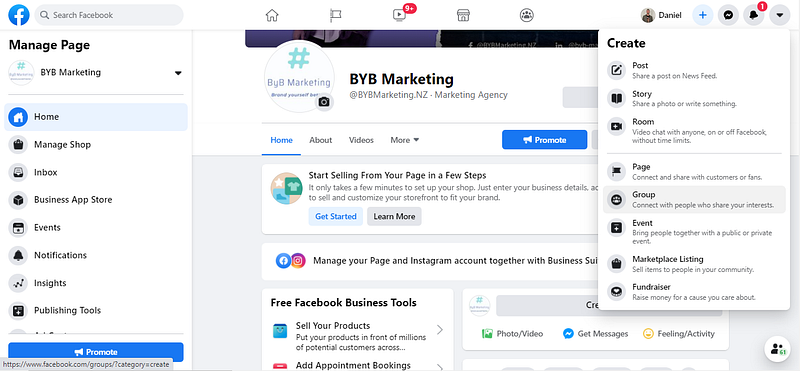
Consider creating your own Facebook group, around the topic of your business.

Facebook business page profile tips

You could also join existing groups relevant to your business/industry.

Moderators facilitate what happens in the group. Everyone in the group can be invited or usually approved, and admin can remove people for behaviour against the group’s rules or spirit.

There are no paid ads in groups, but because the audience already in a segment, e.g., fans of basketball or a TV show, which can be just as powerful as targeted ads.

Some may allow you to post about your business or products. However, often groups with no limits on promotional posts become full of SPAM.

Every single group will not be suitable, but the great thing is there are usually many appropriate options that you can choose.


Summary

In sum, Facebook offers a massive opportunity for businesses to grow brand awareness and have conversations with their target audience.

If you remember to create value for your target audience and engage with your audience, you really cannot go wrong with your strategy.

Thank you for reading. I hope you enjoyed the content.